Everyone is talking about AI. You hear about neural networks at work, on the news, and from that one friend who won't stop mentioning them. But almost nobody tells you the one thing you actually want to know: where do you click first?
This guide fixes that. By the end, you'll understand how to use neural networks — and you'll have run your first one. No programming. No math. No confusing jargon. This is how to use AI for beginners, written for people who have never deliberately opened an AI tool in their life.
Here's the path we'll walk together: understand what a neural network is, see what it can do, pick one free tool, type your first prompt, and get a useful result today. That's it.
In a hurry? Jump straight to "Try your first tool in 5 minutes" and start now. You can read the "why" afterward.
1. What Is a Neural Network in Simple Terms?
A neural network is a computer system that learns to recognize patterns by looking at huge amounts of examples. It isn't programmed with strict rules. Instead, it studies data and figures out the patterns on its own — a bit like how you learned to recognize a dog without memorizing a rulebook.
A brain-inspired pattern machine
The name comes from the human brain. Your brain has neurons that pass signals to each other. A neural network copies that idea in software: many small units pass numbers to each other and slowly get better at a task. You don't need to picture the wiring. Just remember this: it's a machine that spots patterns. That's the whole idea.
Neural network vs. AI vs. "the model" — clearing up the words
These words get tangled, so let's untangle them fast:
- AI (artificial intelligence) is the big umbrella term — any computer doing something "smart."
- Neural network is one popular method for building that intelligence.
- The model is the finished, trained neural network you actually use — like ChatGPT or Gemini.
- LLM (large language model) is a neural network trained on text so it can chat with you.
So when someone says "the model gave a great answer," they mean a trained neural network did. Same thing, friendlier word.
Where you already meet neural networks every day
You've been using neural networks for years without noticing. Here are a few examples:
- Netflix and Spotify suggesting what to watch or hear next.
- Face unlock on your phone recognizing you.
- Translation apps turning one language into another.
- Spam filters quietly hiding junk email.
- Photo apps that group pictures of the same person.
None of that scared you. Using AI on purpose is just as easy — you're only doing it deliberately now.
2. How Do Neural Networks Actually Work? (The 60-Second Version)
You don't need to build one to use one. But a tiny bit of understanding makes you far better at getting good results. Here's the short version.
Input → layers → output
Imagine you show the network a photo and ask, "Is this a cat?"
- Input: the photo goes in as raw data.
- Layers: the network passes it through many steps. Early steps spot edges and colors. Later steps spot ears, whiskers, and shapes.
- Output: it gives an answer — "cat, 98% sure."
Every neural network follows this same flow: something goes in, it passes through layers, an answer comes out. Chatbots do the same with words instead of pixels.
What "training on data" means — and why you don't have to do it
Before a network is useful, it's trained. That means it's shown millions of examples — photos, articles, conversations — called training data. Each time it guesses wrong, it adjusts a little. After enough practice, it gets good.

Here's the great news: this hard part is already done for you. Big companies spent years and millions of dollars training these models. You just use the finished result.
Remember this one line: You don't need to build a neural network — you use one that's already trained. That's the entire beginner mindset.
Generative AI vs. traditional neural network
Older neural networks mostly sorted things — "spam or not spam," "cat or dog." Generative AI is newer. It doesn't just sort; it creates. It writes sentences, draws pictures, and answers questions.
That creative feel is why chatbots seem like magic. Under the hood, they're still predicting patterns — the next likely word or the next likely pixel. But the result feels like a conversation, and that's what makes them so fun to use.
3. What Can You Actually Do With Neural Networks?
Let's get practical. Here are the everyday things beginners use AI for on day one.
Write and summarize text
Draft emails, rewrite messy notes, summarize a long article, or turn bullet points into a polished post. This is the fastest way to feel the value.
Generate images and designs from words
Describe a picture in plain language and get an image back. An AI image generator for beginners like Midjourney tool card or DALL·E tool card can make logos, illustrations, and social posts in seconds — no design skills needed.
Get answers, learn, and research
Ask a question, get a clear explanation. Turn a hard topic into a simple one. Ask for a study plan, a recipe, or a summary of a concept you've always found confusing.
Automate small everyday tasks
Sort ideas, plan a trip, build a checklist, or draft a spreadsheet formula. Small wins add up fast.
Here are concrete "type this, get that" examples you can try today:
- Type: "Rewrite this email to sound friendly and short." → Get: a polished email.
- Type: "Summarize this article in 5 bullet points." → Get: a quick summary.
- Type: "Explain how mortgages work like I'm 12." → Get: a simple explanation.
- Type: "Give me 10 name ideas for a coffee shop." → Get: a brainstorm list.
- Type: "Create a 3-day meal plan for a busy week." → Get: a ready plan.
- Type: "Draw a cozy cabin in the snow at sunset." → Get: an image.
- Type: "Turn these notes into a LinkedIn post." → Get: social-ready text.
- Type: "Fix the grammar in this paragraph." → Get: clean writing.
- Type: "Make a packing list for a beach trip." → Get: a checklist.
- Type: "Suggest questions to ask in a job interview." → Get: a prep list.
4. The 3 Types of Tools You'll Meet as a Beginner
There are hundreds of AI tools. Don't panic — for beginners they fall into just three simple groups.
Chatbots and text models
These are conversation tools. You type; they reply. Popular ones include ChatGPT, Claude tool card, and Gemini. This is the best place to start because it feels exactly like texting a very knowledgeable friend.
Image generators
You describe a picture in words and get artwork back. Midjourney, DALL·E, and Leonardo are common names here. Great for visuals, social media, and just having fun.
All-in-one no-code AI platforms

These bundle text, images, and automation in one place, often with a simpler interface. "No-code" means you build things by clicking and typing — never by writing programming code. Perfect if you want power without complexity. You can explore beginner-friendly AI tools to see what fits you.
| Tool type | Best for | Ease | Free tier |
|---|---|---|---|
| Chatbot / text model | Writing, answers, learning | Very easy | Yes |
| Image generator | Pictures, designs, social posts | Easy | Usually yes |
| All-in-one no-code | Mixing tasks in one place | Easy–medium | Often yes |
Our advice: start with one chatbot. Master it. Add the others later.
5. How to Use a Neural Network for the First Time — Step by Step
This is the heart of the guide. We'll use a chatbot as our example because it's the friendliest starting point. Follow along and you'll have a real result in about five minutes.
Step 1 — Pick one beginner tool
Don't overthink this. Any major chatbot works. A great first choice is the ChatGPT tool card — it's simple, popular, and free to start. Pick one and commit. Jumping between ten tools is the fastest way to get overwhelmed.
[Screenshot placeholder: the tool's home page]
Step 2 — Create a free account
Click "Sign up," enter your email (or use a Google login), and confirm. It takes under a minute. You do not need to enter payment details to use the free version. If a tool demands a card before you've even tried it, skip it.
[Screenshot placeholder: the sign-up screen]
Step 3 — Write your first prompt
A prompt is simply the message you type. Find the empty text box at the bottom of the screen and paste this copy-and-paste template:
"You are a helpful assistant. Write a friendly 3-sentence thank-you message to a customer named Alex who bought a coffee mug. Keep it warm and short."
Press Enter. That's it — you just ran a neural network.
[Screenshot placeholder: the prompt typed into the box]
Step 4 — Read the result and refine it
Read what came back. Not quite right? Don't start over — just reply, like a conversation. Try: "Make it shorter," or "Add a discount code for their next order," or "Sound more playful." Each reply steers the model closer to what you want. This back-and-forth is called follow-up prompting, and it's where the real magic happens.
[Screenshot placeholder: the AI's response]
Step 5 — Save, reuse, and build a habit
Copy your best result somewhere handy. Save prompts that worked in a notes file so you can reuse them. The people who get great at AI aren't smarter — they just practice a little every day. One prompt a day is enough to feel confident within a week.
6. How to Write Good Prompts (The One Skill That Matters Most)
If you learn only one thing from this guide, make it this. Knowing how to write a prompt is 90% of getting great results. The tool is already smart; your job is to be clear.
The R-T-F formula: Role, Task, Format
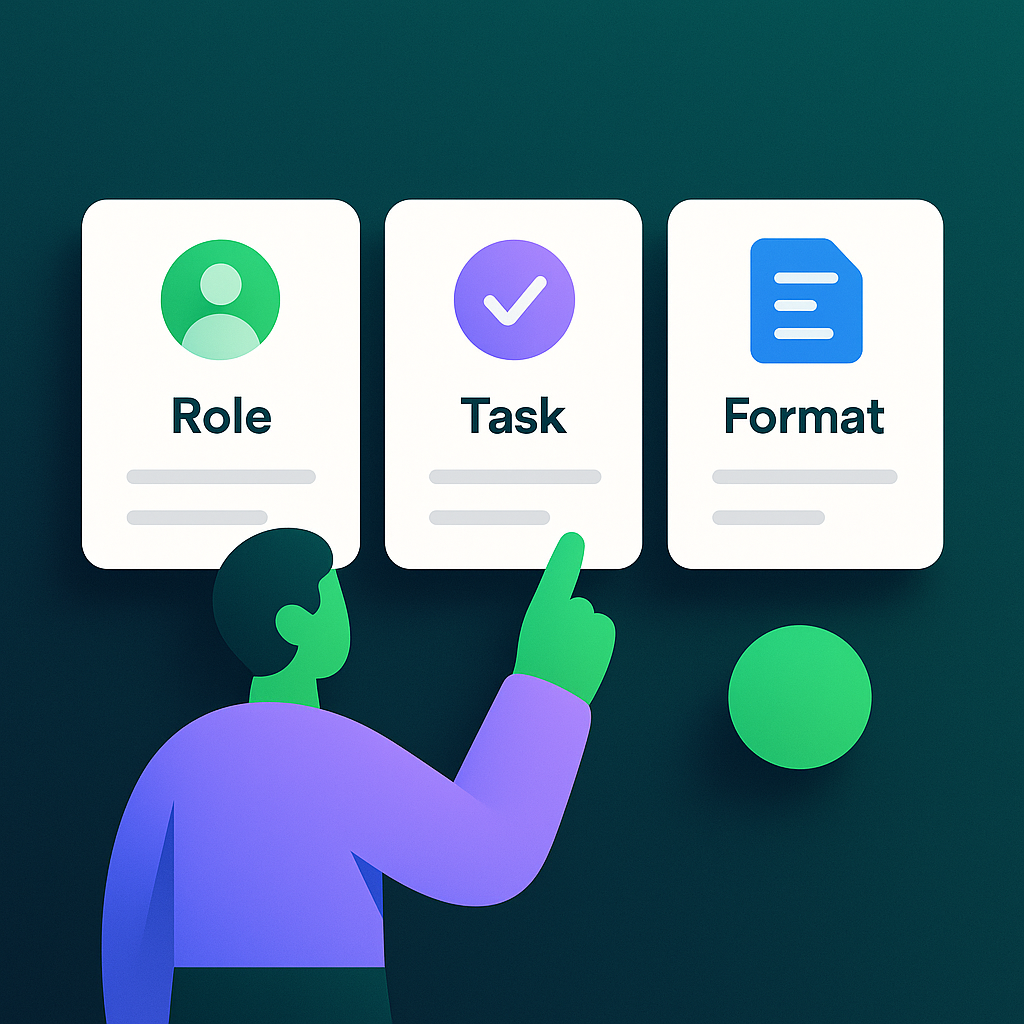
A reliable recipe for almost any prompt:
- Role: tell the AI who to be. "You are an experienced travel planner."
- Task: say exactly what you want. "Plan a 3-day trip to Rome for a couple."
- Format: describe the shape of the answer. "Give it as a day-by-day list with times."
Stack those three and your results jump in quality instantly.
3 before/after prompt examples
| Bad prompt | Good prompt |
|---|---|
| "Write an email." | "You are a polite office manager. Write a short email declining a meeting on Friday and suggesting Monday instead. Keep it under 60 words." |
| "Ideas for my business." | "You are a marketing coach. Give me 5 low-cost ideas to promote a local bakery on Instagram. Explain each in one sentence." |
| "Explain AI." | "Explain what a neural network is to a total beginner, using one everyday example and no technical words." |
See the pattern? Specific beats vague every time.
Follow-up prompting: how to steer the model
Never accept the first answer as final. Guide it. Useful steering phrases:
- "Make it shorter / longer."
- "Use a more casual tone."
- "Give me three different versions."
- "Explain that last part more simply."
Want to go deeper? Our full breakdown on how to write better prompts has more templates you can steal.
10 starter prompts to try today:
- "Summarize this text in 3 bullet points: [paste text]."
- "Rewrite this to sound more professional: [paste text]."
- "Explain [topic] like I'm 10 years old."
- "Give me 5 blog title ideas about [subject]."
- "Plan a healthy dinner using chicken, rice, and broccoli."
- "Write a polite reminder to a client who hasn't paid."
- "Turn these notes into a clear to-do list: [paste notes]."
- "Suggest a 7-day beginner workout at home."
- "Draft an Instagram caption for a sunset beach photo."
- "Act as an interviewer and ask me 5 practice questions for a marketing job."
7. Common Beginner Mistakes (and How to Avoid Them)
Knowing how to get better AI results is mostly about dodging these five traps.
Expecting perfect answers on the first try
Why it hurts: you give up too early. Quick fix: treat the first reply as a rough draft. Refine with one or two follow-ups. The second answer is almost always better.
Trusting everything the AI says
Why it hurts: AI can confidently make things up. This is called a hallucination — an answer that sounds right but isn't. Quick fix: double-check facts, names, numbers, and dates before you rely on them.
Vague, one-word prompts
Why it hurts: vague input gives vague output. Quick fix: use the Role-Task-Format formula. Add context. More detail in means better results out.
Jumping between ten tools
Why it hurts: you stay a beginner in all of them. Quick fix: master one chatbot first. Depth beats variety early on.
Sharing sensitive or personal data
Why it hurts: what you type may be stored. Quick fix: never paste passwords, ID numbers, or confidential work data. Keep it general.

8. Are Neural Network Tools Free? Pricing and Access Explained
One of the biggest beginner worries: "Is it free, or will it cost me later?" Good news — there are plenty of free AI tools to try, and the free tiers are genuinely useful.
What you get on free tiers
Most major tools offer a free plan with generous limits. For a beginner, the free version usually does everything you need: writing, answering, learning, and basic image generation. You can go weeks without paying a cent.
When it's worth upgrading
Consider a paid plan when you hit one of these:
- You want faster responses during busy hours.
- You need higher image quality or more images.
- You're bumping into daily usage limits.
- You want access to the newest, most capable models.
Rough price ranges
Prices change, so treat these as typical, not fixed. Most consumer AI subscriptions land somewhere around $10–$30 per month. Many people happily stay on free tiers indefinitely. To compare current options, explore beginner-friendly AI tools or see plans and pricing.
How to try tools risk-free
Always start on the free tier. Never enter a card just to look around. Test a tool for a week before deciding if it earns your money. If it doesn't click, move on — no harm done.
9. Is It Safe? Privacy and Ethics Basics for Beginners
Safety worries are normal. Here's the honest, practical version.
What happens to what you type
When you send a prompt, it goes to the company's servers to generate a reply. Some companies may use conversations to improve their models. Most let you turn this off in settings. Assume anything you type could be seen — and act accordingly.
Simple do's and don'ts
- Do use AI for general writing, learning, and brainstorming.
- Do check privacy settings and opt out of data training if you prefer.
- Don't paste passwords, bank details, or medical records.
- Don't share other people's private information.
Using AI honestly
At school or work, be transparent. AI is a great helper for drafting and brainstorming. But passing off AI work as fully your own — where that's against the rules — can get you in trouble. When in doubt, disclose that you used AI. Honesty keeps it a tool, not a shortcut you'll regret.
10. What's Next: Your 7-Day Beginner Roadmap
Ready to go from "I read about it" to "I actually use it"? Here's a simple week to build real skill.
Days 1–2: master one chatbot
Pick one text tool. Run at least five prompts a day using Role-Task-Format. Try emails, summaries, and questions. Get comfortable steering with follow-ups.
Days 3–4: try image generation
Open an image tool. Describe three pictures in detail. Notice how more description gives better images. Have fun — this part hooks most people.
Days 5–6: automate one real task
Pick something you actually do — planning meals, writing a report, sorting ideas — and hand it to AI. Feel the time you save.
Day 7: pick a direction and go deeper
Now choose a focus: writing, marketing, images, or productivity. If you'd rather follow a clear path than guess your way forward, a structured beginner AI course walks you through it step by step. Guided learning turns a hobby into a real skill fast.
11. FAQ
Can I use neural networks without any coding?
Yes. Almost every popular AI tool is built for non-coders. You simply type in plain language and read the reply — just like texting. No programming, no setup, and no technical background is required to get useful results from day one.
Do I need to be good at math?
No. You don't need any math to use neural networks. The math lives inside the tool and was handled by its creators. Your only job is writing clear instructions in everyday words. If you can send a text message, you can use AI.
What's the best neural network for a complete beginner?
The best neural network for beginners is a simple chatbot like ChatGPT, Claude, or Gemini. They feel like a conversation, work on any device, and have free plans. Start with one, practice for a week, and add other tools later once you're comfortable.
Are AI tools free to start?
Yes. Most major AI tools offer a free tier that's plenty for beginners. You can write, get answers, and even make images without paying. Upgrade only when you hit usage limits or want faster speed and higher quality — never before you've tested it.
How long does it take to learn to use AI?
You can get a useful result in five minutes. Real comfort takes about a week of daily practice — a few prompts each day. Following a simple roadmap or beginner course speeds this up, but no one needs months to become genuinely capable.
What's the difference between AI, a neural network, and ChatGPT?
AI is the broad idea of smart computers. A neural network is one method for building that intelligence. ChatGPT is a specific product powered by a neural network. So ChatGPT is a neural network, which is a type of AI — three layers of the same family.
Is it safe to enter my data into AI tools?
It's generally safe for everyday tasks, but treat prompts as semi-public. Companies may store or review conversations. Never enter passwords, bank details, or confidential records. Use privacy settings to opt out of data training, and keep sensitive information out of the chat.
Why does the AI sometimes give wrong answers?
AI predicts likely words, so it can sound confident while being wrong. This is called a hallucination. It doesn't truly "know" facts — it guesses patterns. Always double-check names, numbers, dates, and important claims before you rely on an answer.
Can I use AI on my phone?
Yes. Nearly every major AI tool has a free mobile app or works in your phone's browser. You can write prompts, generate images, and get answers on the go. Many people do all their beginner practice entirely from a phone.
What should I learn after the basics?
Once you're comfortable, pick a focus — writing, marketing, images, or automation — and go deeper. A structured beginner course helps you learn AI from scratch without guessing. From there, explore combining tools and building simple no-code projects of your own.
The Bottom Line
Neural networks aren't a distant, technical mystery. They're tools you can open and use today — for free, with zero code and zero math. The whole secret is simple: start with one tool and one clear prompt, then refine. That's how every confident AI user began.
You now know what a neural network is, how it works, what to try, and the mistakes to skip. The only thing left is to click. Ready to begin? Explore beginner-friendly AI tools and pick your first one — or follow a guided beginner AI course if you'd like someone to walk beside you. Either way, your first prompt is five minutes away.

