Product card on white
Studio product photo of a ceramic coffee mug on a pure white background, soft shadows, centered, e-commerce catalog style
aspect: 1:1
Nano Banana API (Gemini Image): image generation and editing through one Zerocoder key. Per-image pricing, OpenAI Images, samples, limits.
Nano Banana is Google's (Gemini) image family for generation and editing. Through Zerocoder you call it as a plain HTTP API: send a prompt, get back an image URL. The family covers five tiers, from a fast cheap model to a pro vip tier, so you pick quality versus cost per request.
The family is strong at following detailed prompts, handling edits on existing images (up to four references in one call), and producing clean results across common aspect ratios for web, social and product shots.
You send a POST request with your prompt, the model id, and either a size or an aspect ratio. For edits, you also attach one or more source images. The API replies with a short JSON object containing a URL to the generated image.
That URL is temporary — fetch and store the file right after the response arrives. Every image is billed at the moment of the request; if the provider itself fails, the charge is refunded automatically in the same response.
The live GET /v1/models price list in US dollars. Where we are cheaper, the vendor's official price for the same unit is struck through. Endpoint: /v1/images/generations
| Model | Price | Unit | Discount |
|---|---|---|---|
Nano Banana 2recommended gemini-image-2 · Googlealso: nano-banana-2, gemini-3-flash | Official price: | per imageofficial: $0.067 · 1K | -60% |
Nano Banana Pro gemini-image-pro · Googlealso: nano-banana-pro, gemini-3-pro | Official price: | per imageofficial: $0.134 · 1K/2K | -78% |
Nano Banana gemini-image · Googlealso: nano-banana, unspecified | Official price: | per imageofficial: $0.039 · 1024×1024 | -72% |
Nano Banana 2 Lite nano-banana-2-lite · Google | Official price: | per imageofficial: $0.0336 · 1K | -60% |
Nano Banana Pro VIP nano-banana-pro-vip · Google | Official price: | per imageofficial: $0.134 · 1K/2K | -20% |
Nano Banana 2.1 nano-banana-2.1 · Google | $0.0267 | per image | — |
Pick a model and a volume — the calculator uses the same formulas as API billing.
Prices from GET /v1/models in US dollars at the internal rate. Failed generations are not charged.
An OpenAI-Images-style request: POST /v1/images/generations with model, prompt and aspect. One image per call (n = 1); the response is a link in data[0].url, not b64_json — download the file right away. Photo edits go to POST /v1/images/edits.
Base URLhttps://zerocoder.comKey — in the x-api-key or Authorization: Bearer header
Model in the samples — gemini-3-flash; any model from the table works
import requests URL = "https://zerocoder.com/api/v1/images/generations"H = {"x-api-key": "zc-sk-…"} r = requests.post(URL, headers=H, json={ "model": "gemini-3-flash", "prompt": "Studio photo of a ceramic mug, soft light", "aspect": "1:1", # or 16:9 / 9:16 / 4:3 / 3:4})r.raise_for_status()# n=1: one image per call, as a URL (no b64_json)print(r.json()["data"][0]["url"])const endpoint = "https://zerocoder.com/api/v1/images/generations";const r = await fetch(endpoint, { method: "POST", headers: { "x-api-key": "zc-sk-…", "content-type": "application/json", }, body: JSON.stringify({ model: "gemini-3-flash", prompt: "Studio photo of a ceramic mug, soft light", aspect: "1:1", }),});const out = await r.json();if (!r.ok) throw new Error(out.error.message);console.log(out.data[0].url); // n=1, a URL (no b64_json)curl https://zerocoder.com/api/v1/images/generations \ -H "x-api-key: zc-sk-…" \ -H "content-type: application/json" \ -d '{"model": "gemini-3-flash", "aspect": "1:1", "prompt": "Studio photo of a ceramic mug, soft light"}'# → {"created":…,"data":[{"url":"https://…"}]}# n=1: one image per call, a URL (no b64_json);# the URL is temporary — download the file right away# JSON — image(s) by https URL or data URI, up to 4curl https://zerocoder.com/api/v1/images/edits \ -H "x-api-key: zc-sk-…" \ -H "content-type: application/json" \ -d '{"model": "gemini-3-flash", "aspect": "16:9", "prompt": "Make it a night scene", "image": "https://example.com/photo.jpg"}' # multipart — files from disk (≤ 8 MB each)curl https://zerocoder.com/api/v1/images/edits \ -H "x-api-key: zc-sk-…" \ -F model=gemini-3-flash -F aspect=16:9 \ -F prompt="Make it a night scene" \ -F "image[]=@photo1.jpg" -F "image[]=@photo2.jpg"Google list price (Nano Banana 2 (Gemini 3.1 Flash Image), 1K); checked 4 October 2026

From a key to production — six steps based on the real /api/v1 contracts. Each step links to the relevant docs section.
Sign up, open the API section of your account, top up the balance and create a zc-sk-… key. One key unlocks Nano Banana and every other model in the catalogue.
Read more →POST /v1/images/generations with model, prompt and aspect or size — the response has data[0].url with the finished Nano Banana image.
Read more →The image URL is temporary — download the file to your own storage right away. For edits use /v1/images/edits: up to four source images by https URL, data URI or multipart, up to 8 MB each.
Read more →30 requests per minute per key: on 429 wait and retry with a growing pause; 402 — top up the balance; 400 — check model against GET /v1/models. Failed generations are not charged, so retrying is safe.
Read more →GET /v1/balance returns the balance and 30-day spend; every call's price comes back in the response — write it to your logs and set an alert threshold in your own monitoring.
Read more →Keep the key in server secrets, never in the frontend. For high Nano Banana volumes contact us — the limit is raised individually and companies can pay by invoice. Check the observed stability on the status page.
Read more →HTTP Request node: POST to the /api/v1 endpoint, x-api-key header and a JSON body built from workflow fields. For video add a Wait node and a second HTTP Request on GET ?id= in a loop until completed.
HTTP “Make a request” module: POST, Body type JSON, x-api-key header. The response is parsed automatically — the image url or the answer text flows into the next modules.
Webhooks by Zapier → Custom Request action: POST, Data — JSON with model and prompt, Headers — x-api-key. Response fields are available to the following Zap steps.
In Apps Script use UrlFetchApp.fetch with method post, contentType application/json and a payload from the cells: prompts in one column, results written to the next one.
A bot on aiogram, grammY or Telegraf calls the same HTTP API: user message → model request → reply in the chat. For video — poll the status and send the file from the finished URL.
For text models the official OpenAI and Anthropic SDKs work with a swapped base URL and our key — your application code stays the same. Images and video are a plain HTTP call from any language.

More than a key: we help wire Nano Banana and other models into your workflows — from audit to production, with invoice payment.
# 401 {"type":"error","error":{"type":"authentication_error","message":"Invalid or revoked API key."}}
# 402 {"type":"error","error":{"type":"billing_error","message":"Not enough API balance: …"}}
# 429 {"type":"error","error":{"type":"rate_limit_error","message":"…"}}   ← 30 requests/min per key
# 400 {"type":"error","error":{"type":"invalid_request_error","message":"Unknown model \"…\". See GET /v1/models."}}
# 413 {"type":"error","error":{"type":"invalid_request_error","message":"…"}}   ← > 8 MB per file / > 48 MB body
# 502 {"type":"error","error":{"type":"api_error","message":"…"}}                ← provider failed → nothing charged
Numbers come from the public /status summary: the share of successful requests over a period for the whole API and for the category as a whole (the summary has no per-model breakdown), no SLA promises. Failed generations are not charged, so retrying is safe.
Tracking since Aug 6, 2026.
Generate product mockups on demand inside an e-commerce admin panel
Build a Telegram bot that turns user prompts into illustrations
Batch-create blog cover images in a CMS publishing pipeline
Let a design tool edit uploaded photos based on short text instructions
Automate marketing banner variants for A/B testing in an internal tool
Swap backgrounds or outfits in user avatars for a social app feature
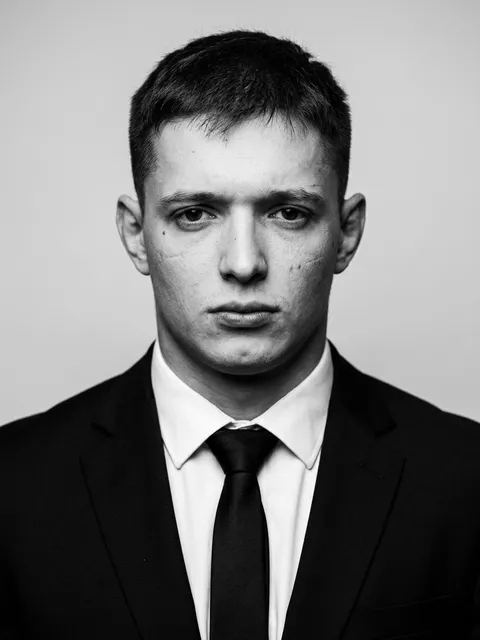
Works by Zerocoder users made with this model: preview, resolution, duration and date. Nothing was generated specifically for this page.
 145
145 52
52 34
34 27
27 59
59 46
46 32
32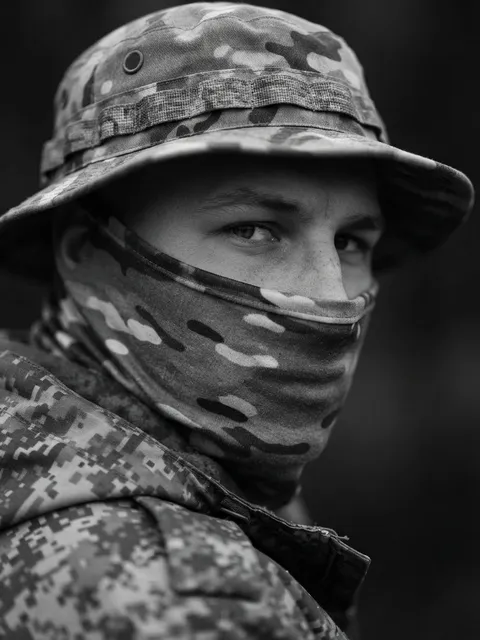 23
23| Model | Date | Likes | Prompt |
|---|---|---|---|
| Nano Banana 2 | 4 September 2026 | 145 | Ultra-realistic black and white studio portrait of the uploaded man, wearing a perfectly tailored black suit, white dress shirt and black ti |
| Nano Banana 2 | 2 September 2026 | 59 | Любительское вечернее фото в помещении, ощущение спонтанного кадра. Девушка сидит на полу или низком пуфе среди больших роскошных букетов ро |
| Nano Banana | 23 July 2026 | 52 | Используя прикреплённое референс-фото только как основу для лица, сохрани 100% сходство внешности. В кадре ровно четыре человека: один задер |
| Nano Banana 2 | 12 August 2026 | 46 | Реалистичное ночное фото с телефона, 9:16. Камера находится сзади чёрного Mercedes-Benz G63 AMG и направлена сверху вниз через открытое води |
| Nano Banana | 30 July 2026 | 34 | Используя прикреплённое референс-фото только как основу для лица, сохрани 100% сходство внешности без изменений. Парень идёт в сторону полно |
| Nano Banana | 24 September 2026 | 32 | Сделай пожалуйста так что бы мое лицо было как будто я рядом с президентом |
| Nano Banana 2 | 27 August 2026 | 27 | сделай лицо более размытым, как будто сфотографировали в движении |
| Nano Banana 2 | 9 August 2026 | 23 | Ультраблизкий гиперреалистичный портрет, фотореализм, документальная подача, сверхдетализация кожи, глаз, ресниц и текстуры ткани Черно- бел |

Copy the prompt and the parameters into the request body — the fields are named exactly as in the /api/v1 contract. Replace the angle-bracket placeholders with your material.
Studio product photo of a ceramic coffee mug on a pure white background, soft shadows, centered, e-commerce catalog style
aspect: 1:1The same ceramic mug on a wooden cafe table next to a croissant, morning window light, shallow depth of field
aspect: 4:3Replace the background with a sunlit kitchen counter, keep the product, its shadows and colors unchanged
endpoint: /v1/images/editsimage: https://…/photo.jpgaspect: 1:1Put the sneaker from the first image on the model from the second image, match lighting and perspective
endpoint: /v1/images/editsimage: [url1, url2]Up to four source images per request.
Clean isometric infographic of a three-step delivery process: warehouse, truck, doorstep, flat colors, empty label areas for text
aspect: 16:9Friendly illustrated avatar of a smiling person with short curly hair and round glasses, soft gradient background, vector style
aspect: 1:1
Industries where this kind of generation becomes part of the workflow rather than an experiment.
Same key, same balance, same request contracts.
Nano Banana is billed per finished image — each version has its own per-image price in the table above and in GET /v1/models. Generation and editing via /v1/images/edits cost the same for a given version; a batch is the price times the number of images. The calculator on this page shows the total up front.
The request is OpenAI-Images-compatible: POST /v1/images/generations with the x-api-key header and a body of model, prompt and aspect — the response carries data[0].url with the finished image. Use the official OpenAI SDK with base_url set to zerocoder.com/api/v1, or plain requests. The Nano Banana sample is in the “First request” block above.
The aspect ratio is set with aspect — 1:1, 16:9, 9:16, 4:3 or 3:4 — or with size such as 1024x1024, 1792x1024, 1024x1792. One request produces one Nano Banana image (n above one is not supported). Editing accepts up to 4 images of 8 MB each. The shared key limit is 30 requests per minute.
All Nano Banana versions are listed in the table and in GET /v1/models. Pro is for complex prompts, legible lettering and fine detail; the standard version is the all-round choice for product cards and illustrations; Lite is for bulk drafts at the lowest per-image price. If the model field is omitted, the default version from the price list is used.
No. If the provider fails to generate or edit the picture, Nano Banana charges nothing — the request ends with an error and the balance is unchanged. Only responses with a finished link in data[0].url are paid for. If the link expires before you download the file, a repeat request is a new paid generation — save the result immediately.
Yes. A legal entity requests an invoice in the API account, pays by bank transfer, and the amount is credited to the API balance — the key for Nano Banana and other models stays the same. Cards top up the balance instantly; accounting documents are available on request. No Google account or dollar payments needed.
The API itself has no free images: the wallet starts with a minimum first top-up and every Nano Banana generation is charged at the list price. You can check for free how the model handles your prompts and photo edits in the Zerocoder studio and the Nano Banana tool in the catalogue — then repeat the same requests via the API.
Send POST /v1/images/edits: the source as an https URL, a data URI or a multipart file, the instruction in prompt as one phrase (“make it evening light”). Nano Banana changes only what you asked while keeping the composition and the person's look; up to 4 references in images[] are merged into one scene — handy for carrying a character across images.

Up to -78% vs the official API · one key, pay per call