Check page meta tags free
Title, description, Open Graph, canonical and H1 — a graded table for any URL in a second.
The page's SEO markup at a glance
How to check meta tags in 4 steps
Yours or a competitor's — any public page.
We fetch the page and parse the markup.
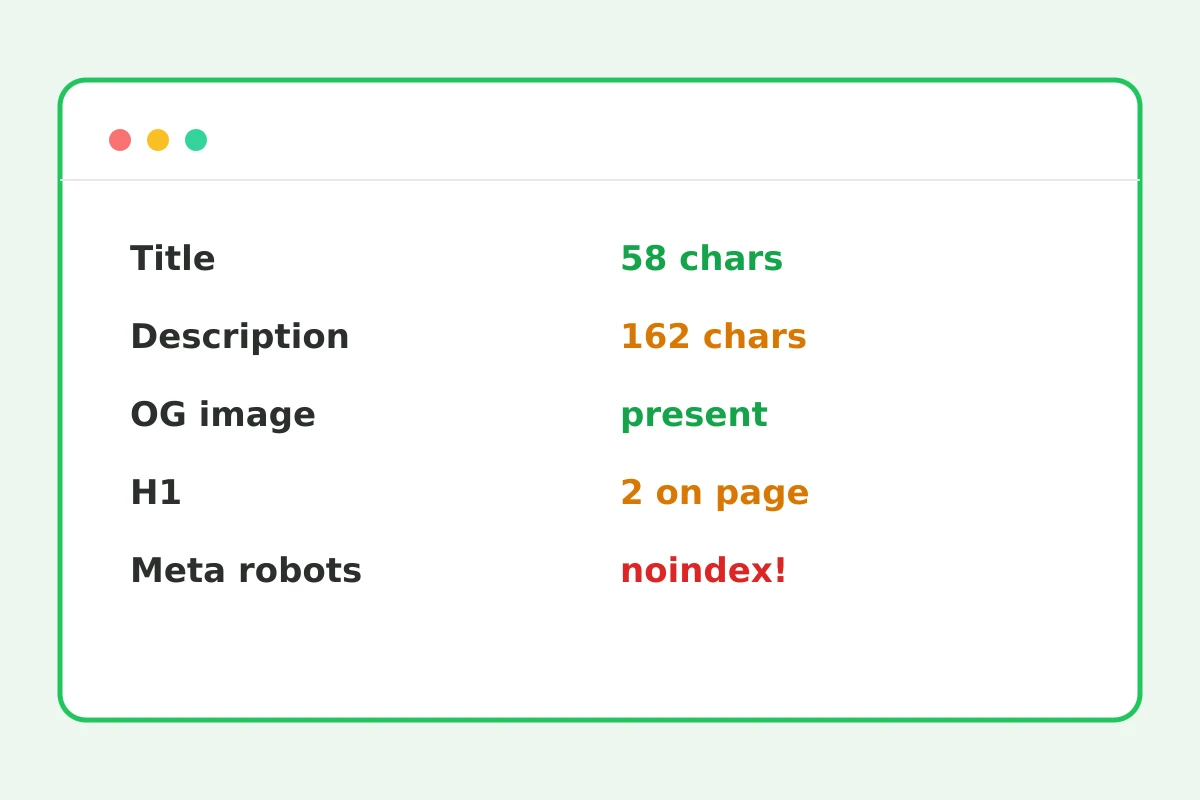
Green — ok, yellow — attention, red — missing.
Changes show right after you update the page.
Part of the Zerocoder platform
One tool of a platform where AI generates websites, images, video, text and documents — under one subscription.
Meta tags decide how a page looks in search results and social feeds: title and description form the snippet, Open Graph builds the repost card, canonical guards against duplicates. The checker fetches the page and lays the markup out in a graded table: tag lengths, OG image presence, H1 uniqueness, meta robots. Check your pages after edits — and competitors' pages for ideas. Make the slug with the slug generator, verify snippet length with the character counter, build robots.txt with the generator. All tools — in one section.
Title and description: lengths that work
Title is the page's main tag: 30–65 characters, the key query near the start, no comma-stuffed lists. Description doesn't rank directly but forms the snippet: 120–170 characters with a benefit and a call lift click-through. The checker flags out-of-range lengths yellow — the signal that search results will truncate your text with an ellipsis.
Open Graph: why a bare link loses clicks
A link with an image, headline and description collects times more clicks in messengers than a naked URL. The card comes from og:title, og:description and og:image — read by every social network and messenger. A 1200×630 image is the standard; without it the platform grabs a random picture or shows a grey box.
Canonical, H1 and meta robots: silent traffic killers
A missing canonical breeds duplicates under URL parameters; two H1s blur the page's topic; a noindex accidentally left after a site migration kills traffic silently — the page just vanishes from results. The checker flags noindex red: if you see it on a production page, fix that first.
Reviews
No reviews yet — be the first.
More in Free tools
View category →







From the blog
All posts →


FAQ
What exactly is checked?
The checker grades title and its length, description, canonical, og:title, og:description and og:image, the Twitter card, meta robots, viewport, favicon, the lang attribute and the H1 count — all in one table.
What's the right title length?
Aim for 30–65 characters. Shorter wastes snippet space in search results; longer gets cut off with an ellipsis. The meta tag check flags anything outside that range instantly.
Can I check other people's pages?
Yes, the tool opens any publicly accessible page by URL. That makes competitor analysis easy: see how their title, description and Open Graph tags are set up and compare with your own.
Why couldn't it open my site?
The site must be reachable from the internet: local addresses like localhost and pages behind a login are invisible to the checker. Publish the page or open access, then run the check again.
What does a red meta robots mean?
The page carries noindex, so search engines will skip it. That is fine for drafts, but on a production page the tag has to go or it will never appear in search results.
How many checks per day?
The first check runs without an account. After a free sign-in the limit is 5 checks per day — enough to keep an eye on your site's key pages regularly.
Do I need an account?
No account is needed for the first check. After that we ask for a free sign-up, which unlocks 5 checks a day and the rest of the Zerocoder Studio utilities.
Is page data stored?
No: the page is fetched, parsed and returned to you as a graded table right away. Neither the HTML nor the meta tag results are kept on the servers.
What else does Zerocoder do?
The Studio includes a site generator with correct markup out of the box, AI text generation and courses. The meta tags checker is one of Zerocoder's free utilities.